
1. 2009.6 Linux 시스템 모니터 #
[PNG image (233.98 KB)]
● 프로그램 요약
I. Myps System Manager 란?
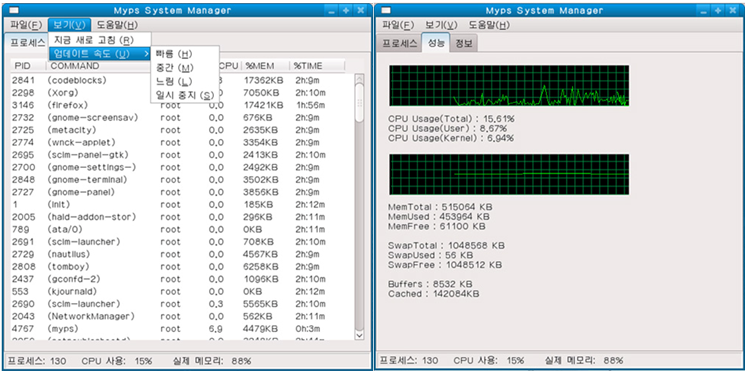
▶ 리눅스 GUI(X-Window) 환경에서 프로세서 관리를 위한 모니터링 프로그램. 윈도우의 작업 관리자와 비슷한 기능을 한다.
메모리 사용량과 CPU 사용량, 모든 프로세스의 실시간 정보 등를 보여주며 GUI로 프로세스의 작업을 관리할 수 있다.

II. 프로그램 개발 언어(SDK) 및 환경
▶ 개발 언어(SDK) : C++(WxWidget)
▶ 개발 환경 : Code::Blocks, Fedora 9

III. 사용 환경
▶ GNU/Linux (kernel 2.6.X)

IV. 주요 기능
①	현재 시스템의 모든 프로세스 출력
▶ 포어그라운드, 백그라운드 프로세스 등 시스템의 모든 프로세스를 출력해 보여주는 기능.
②	CPU/메모리 사용률 출력
▶ 프로세스 종류별로 일정 시간 동안 사용된 CPU 사용률과 메모리와 사용량을 실시간으로 보여주는 기능.
③	프로세스 작업 수행의 전환
▶ GUI 조작을 통해 프로세스를 선택하고 명령을 내릴 수 있다.
코드 샘플 #1
메인 갱신 루프
void mypsFrame::OnTimer1Trigger1(wxTimerEvent& event)
{
cpus = cpus_read(cpus);
wxString text = wxString::Format(_T("CPU Usage(Total) : %.2f%%\nCPU Usage(User) : %.2f%%\nCPU Usage(Kernel) : %.2f%%\n"),
cpus->usage_tot,
cpus->usage_usr,
cpus->usage_krn);
StaticText1->SetLabel(text);
mems = mems_read(mems);
text = wxString::Format(_T("MemTotal : %d KB\nMemUsed : %d KB\nMemFree : %d KB\n\nSwapTotal : %d KB\nSwapUsed : %d KB\nSwapFree : %d KB\n\nBuffers : %d KB\nCached : %dKB"),
mems->memtotal,
mems->memtotal - mems->memfree,
mems->memfree,
mems->swaptotal,
mems->swaptotal - mems->swapfree,
mems->swapfree,
mems->buffers,
mems->cached);
StaticText2->SetLabel(text);
int sinceboot = 0;
int running = 0;
int tickspersec = 0;
int sec = 0;
int diff[2];
float scale = 0.0;
double itemIndex = 0.0;
int numproc = 0;
int idx = 0;
procVectItor itor;
PROC_t tempps;
struct dirent *item;
DIR *dp = NULL;
if (dp = opendir("/proc/"))
{
while (1)
{
item = readdir(dp);
if (item == NULL)
break;
if (atoi(item->d_name))
{
// read on pid stat
++numproc;
// PID COMMAND USER %CPU %MEM %TIME
procs = procstat(item->d_name, procs);
procs->flag = 1;
if (ps.empty()) {
ps.push_back(*procs);
} else if ((itor = (find(ps.begin(), ps.end(), procs->pid))) != ps.end()) {
procs->utime_sav = itor->utime_sav;
procs->stimev_sav = itor->stimev_sav;
ps.erase(itor);
ps.insert(itor, *procs);
} else {
ps.push_back(*procs);
}
}
}
closedir(dp);
sort(ps.begin(), ps.end());
}
if (ListCtrl1->GetItemCount() == 0)
{
for (itor = ps.begin(); itor != ps.end(); ++itor)
{
sinceboot = gettimesinceboot();
running = sinceboot - itor->start_time;
tickspersec = sysconf(_SC_CLK_TCK);
sec = (int)running / tickspersec;
diff[0] = itor->utime - itor->utime_sav;
diff[1] = itor->stimev - itor->stimev_sav;
scale = (diff[0] + diff[1]) * 100 / (float)cpus->total_sav;
itor->utime_sav = itor->utime;
itor->stimev_sav = itor->stimev;
itor->cpu_usage = scale;
itor->flag = 0;
text = wxString::Format(_T("%d"), (int)itor->pid);
itemIndex = ListCtrl1->InsertItem(idPID, text);
text = wxString::FromAscii(itor->tcomm);
ListCtrl1->SetItem(itemIndex, idCMD, text);
text = wxString::FromAscii(itor->username);
ListCtrl1->SetItem(itemIndex, idUSR, text);
text = wxString::Format(_T("%.1f"), scale);
ListCtrl1->SetItem(itemIndex, idCPU, text);
text = wxString::Format(_T("%dKB"), (int)itor->rss);
ListCtrl1->SetItem(itemIndex, idMEM, text);
text = wxString::Format(_T("%2dh:%dm"), (int)((int)(sec / 60) / 60), (int)((sec / 60))%60);
ListCtrl1->SetItem(itemIndex, idTME, text);
}
} else {
for (itor = ps.begin(); itor != ps.end(); ++itor)
{
text = wxString::Format(_T("%d"), (int)itor->pid);
itemIndex = ListCtrl1->FindItem(idPID, text);
if(itor->flag == 0)
{
ListCtrl1->DeleteItem(itemIndex);
continue;
}
sinceboot = gettimesinceboot();
running = sinceboot - itor->start_time;
tickspersec = sysconf(_SC_CLK_TCK);
sec = (int)running / tickspersec;
diff[0] = itor->utime - itor->utime_sav;
diff[1] = itor->stimev - itor->stimev_sav;
scale = (diff[0] + diff[1]) * 100 / (float)cpus->total_sav;
itor->utime_sav = itor->utime;
itor->stimev_sav = itor->stimev;
itor->cpu_usage = scale;
itor->flag = 0;
if(itemIndex < 0)
{
text = wxString::Format(_T("%d"), (int)itor->pid);
itemIndex = ListCtrl1->InsertItem(idPID, text);
text = wxString::FromAscii(itor->tcomm);
ListCtrl1->SetItem(itemIndex, idCMD, text);
text = wxString::FromAscii(itor->username);
ListCtrl1->SetItem(itemIndex, idUSR, text);
text = wxString::Format(_T("%.1f"), scale);
ListCtrl1->SetItem(itemIndex, idCPU, text);
text = wxString::Format(_T("%dKB"), (int)itor->rss);
ListCtrl1->SetItem(itemIndex, idMEM, text);
text = wxString::Format(_T("%2dh:%dm"), (int)((int)(sec / 60) / 60), (int)((sec / 60))%60);
ListCtrl1->SetItem(itemIndex, idTME, text);
continue;
}
text = wxString::Format(_T("%d"), (int)itor->pid);
ListCtrl1->SetItem(itemIndex, idPID, text);
text = wxString::FromAscii(itor->tcomm);
ListCtrl1->SetItem(itemIndex, idCMD, text);
text = wxString::FromAscii(itor->username);
ListCtrl1->SetItem(itemIndex, idUSR, text);
text = wxString::Format(_T("%.1f"), scale);
ListCtrl1->SetItem(itemIndex, idCPU, text);
text = wxString::Format(_T("%dKB"), (int)itor->rss);
ListCtrl1->SetItem(itemIndex, idMEM, text);
text = wxString::Format(_T("%2dh:%dm"), (int)((int)(sec / 60) / 60), (int)((sec / 60))%60);
ListCtrl1->SetItem(itemIndex, idTME, text);
}
}
//Note: 이 부분에 리스트 컨트롤 정렬을 넣고 싶으나 레퍼런스가 부족하다.
// ::SetColumnsOrder() 함수를 제공하나 윈도우만 가능하다.
text = wxString::Format(_T("프로세스: %d\t CPU 사용: %3d%%\t실제 메모리: %3d%%"), numproc, (int)cpus->usage_tot, ((mems->memtotal - mems->memfree) * 100)/mems->memtotal);
StatusBar1->PushStatusText(text);
}
void mypsFrame::OnListCtrl1ItemRClick(wxListEvent& event)
{
wxMessageDialog *Dlg = new wxMessageDialog(NULL, _T("이 프로세스를 끝내시겠습니까?\n\n비정상적인 종료는 시스템이 불안정해질 수 있습니다. 계속하시겠습니까?"), _T("kill"), wxOK | wxCANCEL | wxICON_QUESTION);
if(Dlg->ShowModal() == wxID_CANCEL)
return;
wxString text = event.GetText();
int pid = atoi((const char*)text.mb_str(wxConvUTF8));
kill(pid, SIGTERM);
}
{
cpus = cpus_read(cpus);
wxString text = wxString::Format(_T("CPU Usage(Total) : %.2f%%\nCPU Usage(User) : %.2f%%\nCPU Usage(Kernel) : %.2f%%\n"),
cpus->usage_tot,
cpus->usage_usr,
cpus->usage_krn);
StaticText1->SetLabel(text);
mems = mems_read(mems);
text = wxString::Format(_T("MemTotal : %d KB\nMemUsed : %d KB\nMemFree : %d KB\n\nSwapTotal : %d KB\nSwapUsed : %d KB\nSwapFree : %d KB\n\nBuffers : %d KB\nCached : %dKB"),
mems->memtotal,
mems->memtotal - mems->memfree,
mems->memfree,
mems->swaptotal,
mems->swaptotal - mems->swapfree,
mems->swapfree,
mems->buffers,
mems->cached);
StaticText2->SetLabel(text);
int sinceboot = 0;
int running = 0;
int tickspersec = 0;
int sec = 0;
int diff[2];
float scale = 0.0;
double itemIndex = 0.0;
int numproc = 0;
int idx = 0;
procVectItor itor;
PROC_t tempps;
struct dirent *item;
DIR *dp = NULL;
if (dp = opendir("/proc/"))
{
while (1)
{
item = readdir(dp);
if (item == NULL)
break;
if (atoi(item->d_name))
{
// read on pid stat
++numproc;
// PID COMMAND USER %CPU %MEM %TIME
procs = procstat(item->d_name, procs);
procs->flag = 1;
if (ps.empty()) {
ps.push_back(*procs);
} else if ((itor = (find(ps.begin(), ps.end(), procs->pid))) != ps.end()) {
procs->utime_sav = itor->utime_sav;
procs->stimev_sav = itor->stimev_sav;
ps.erase(itor);
ps.insert(itor, *procs);
} else {
ps.push_back(*procs);
}
}
}
closedir(dp);
sort(ps.begin(), ps.end());
}
if (ListCtrl1->GetItemCount() == 0)
{
for (itor = ps.begin(); itor != ps.end(); ++itor)
{
sinceboot = gettimesinceboot();
running = sinceboot - itor->start_time;
tickspersec = sysconf(_SC_CLK_TCK);
sec = (int)running / tickspersec;
diff[0] = itor->utime - itor->utime_sav;
diff[1] = itor->stimev - itor->stimev_sav;
scale = (diff[0] + diff[1]) * 100 / (float)cpus->total_sav;
itor->utime_sav = itor->utime;
itor->stimev_sav = itor->stimev;
itor->cpu_usage = scale;
itor->flag = 0;
text = wxString::Format(_T("%d"), (int)itor->pid);
itemIndex = ListCtrl1->InsertItem(idPID, text);
text = wxString::FromAscii(itor->tcomm);
ListCtrl1->SetItem(itemIndex, idCMD, text);
text = wxString::FromAscii(itor->username);
ListCtrl1->SetItem(itemIndex, idUSR, text);
text = wxString::Format(_T("%.1f"), scale);
ListCtrl1->SetItem(itemIndex, idCPU, text);
text = wxString::Format(_T("%dKB"), (int)itor->rss);
ListCtrl1->SetItem(itemIndex, idMEM, text);
text = wxString::Format(_T("%2dh:%dm"), (int)((int)(sec / 60) / 60), (int)((sec / 60))%60);
ListCtrl1->SetItem(itemIndex, idTME, text);
}
} else {
for (itor = ps.begin(); itor != ps.end(); ++itor)
{
text = wxString::Format(_T("%d"), (int)itor->pid);
itemIndex = ListCtrl1->FindItem(idPID, text);
if(itor->flag == 0)
{
ListCtrl1->DeleteItem(itemIndex);
continue;
}
sinceboot = gettimesinceboot();
running = sinceboot - itor->start_time;
tickspersec = sysconf(_SC_CLK_TCK);
sec = (int)running / tickspersec;
diff[0] = itor->utime - itor->utime_sav;
diff[1] = itor->stimev - itor->stimev_sav;
scale = (diff[0] + diff[1]) * 100 / (float)cpus->total_sav;
itor->utime_sav = itor->utime;
itor->stimev_sav = itor->stimev;
itor->cpu_usage = scale;
itor->flag = 0;
if(itemIndex < 0)
{
text = wxString::Format(_T("%d"), (int)itor->pid);
itemIndex = ListCtrl1->InsertItem(idPID, text);
text = wxString::FromAscii(itor->tcomm);
ListCtrl1->SetItem(itemIndex, idCMD, text);
text = wxString::FromAscii(itor->username);
ListCtrl1->SetItem(itemIndex, idUSR, text);
text = wxString::Format(_T("%.1f"), scale);
ListCtrl1->SetItem(itemIndex, idCPU, text);
text = wxString::Format(_T("%dKB"), (int)itor->rss);
ListCtrl1->SetItem(itemIndex, idMEM, text);
text = wxString::Format(_T("%2dh:%dm"), (int)((int)(sec / 60) / 60), (int)((sec / 60))%60);
ListCtrl1->SetItem(itemIndex, idTME, text);
continue;
}
text = wxString::Format(_T("%d"), (int)itor->pid);
ListCtrl1->SetItem(itemIndex, idPID, text);
text = wxString::FromAscii(itor->tcomm);
ListCtrl1->SetItem(itemIndex, idCMD, text);
text = wxString::FromAscii(itor->username);
ListCtrl1->SetItem(itemIndex, idUSR, text);
text = wxString::Format(_T("%.1f"), scale);
ListCtrl1->SetItem(itemIndex, idCPU, text);
text = wxString::Format(_T("%dKB"), (int)itor->rss);
ListCtrl1->SetItem(itemIndex, idMEM, text);
text = wxString::Format(_T("%2dh:%dm"), (int)((int)(sec / 60) / 60), (int)((sec / 60))%60);
ListCtrl1->SetItem(itemIndex, idTME, text);
}
}
//Note: 이 부분에 리스트 컨트롤 정렬을 넣고 싶으나 레퍼런스가 부족하다.
// ::SetColumnsOrder() 함수를 제공하나 윈도우만 가능하다.
text = wxString::Format(_T("프로세스: %d\t CPU 사용: %3d%%\t실제 메모리: %3d%%"), numproc, (int)cpus->usage_tot, ((mems->memtotal - mems->memfree) * 100)/mems->memtotal);
StatusBar1->PushStatusText(text);
}
void mypsFrame::OnListCtrl1ItemRClick(wxListEvent& event)
{
wxMessageDialog *Dlg = new wxMessageDialog(NULL, _T("이 프로세스를 끝내시겠습니까?\n\n비정상적인 종료는 시스템이 불안정해질 수 있습니다. 계속하시겠습니까?"), _T("kill"), wxOK | wxCANCEL | wxICON_QUESTION);
if(Dlg->ShowModal() == wxID_CANCEL)
return;
wxString text = event.GetText();
int pid = atoi((const char*)text.mb_str(wxConvUTF8));
kill(pid, SIGTERM);
}
2. 2009.10 IIR 필터 구현 #
 개발기간 7일 (2009년 9월 2 6일 ~ 2009년 10월 3일)

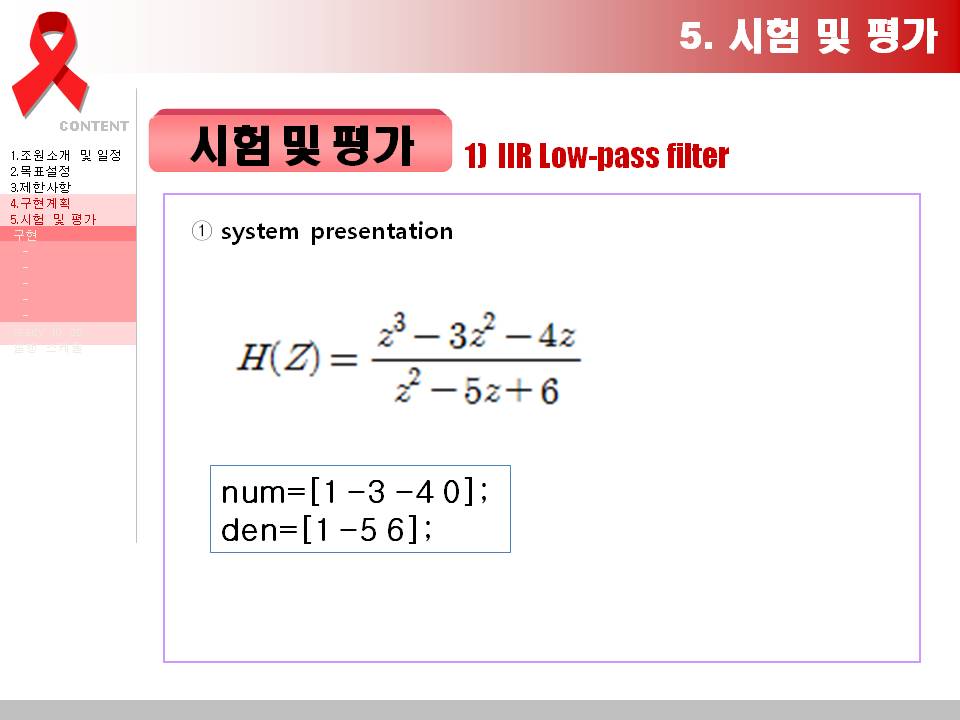
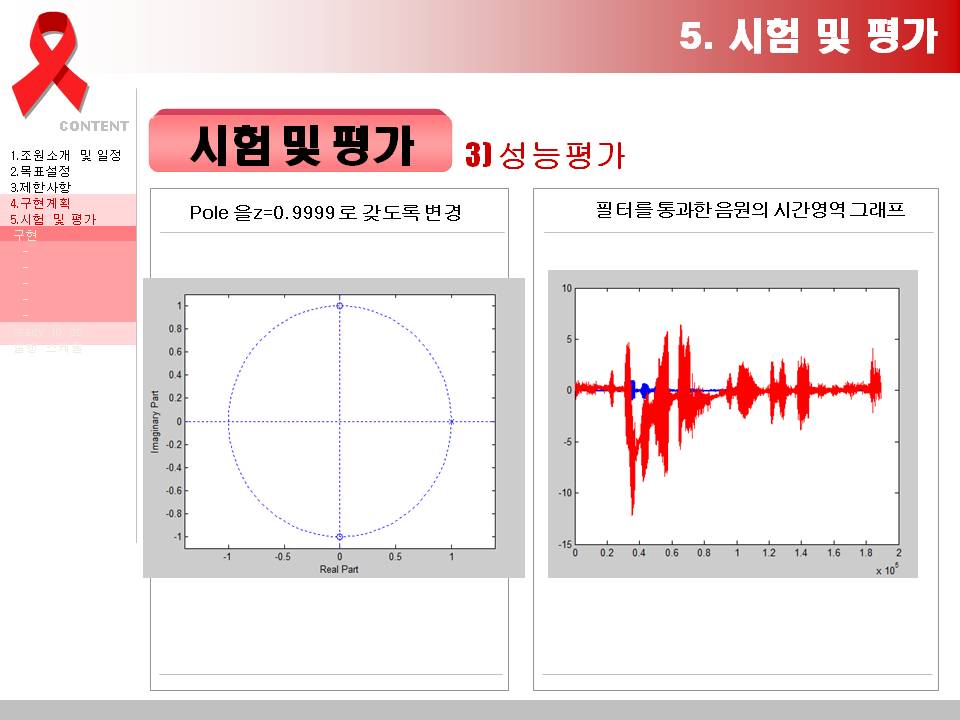
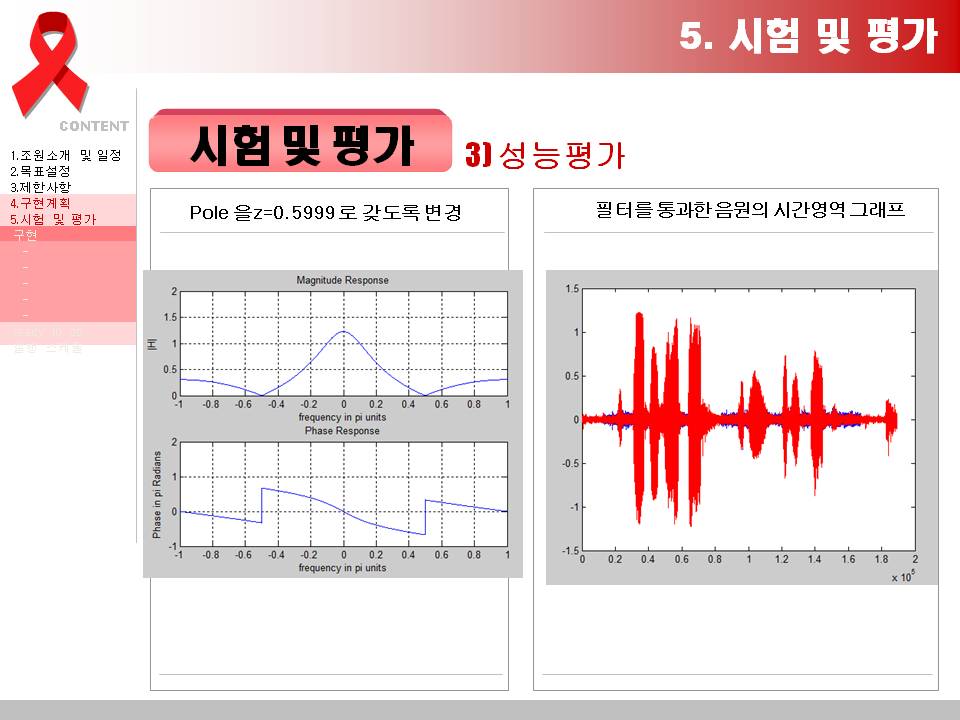
Stable, Non-causal한 시스템 특성을 갖는 IIR 필터 설계 및 구현. 그리고 성능평가.
음향 원본에 필터를 적용하면 리버브 필터가 된다.
[JPG image (48.64 KB)]
[JPG image (65.32 KB)]
[JPG image (78.17 KB)]
3. 2009.12 네트워크 MP3 플레이어 #
[PNG image (264.49 KB)]
 개발기간 50일 (2009년 11월 2일 ~ 2009년 12월 2 2일)

● 프로그램 요약
I. Network MP3 Player 란?
▶ ARM 계열 프로세서와 4 Line LCD, 키패드, 네트워크 접근이 가능한 장비에서 임베디드 리눅스 기반으로 MP3 플레이어를 구현한다.
기존의 MP3 플레이어의 기능에 무선랜카드를 연동하여 밖에 있을 때도 홈 PC에 있는 듣고 싶은 MP3 음악을 들을 수 있다는 것이 가장 큰 장점이다.

II. 프로그램 개발 언어 및 환경
▶ 개발 언어 : C
▶ 개발 환경 : vi editor

III. 사용 환경
▶ Embedded Linux

IV. 주요 기능
①	음악 목록 출력 & 디렉토리 탐색
▶ 임베디드 장비의 로컬 영역에 있는 음악 파일 목록을 4 Line LCD에 출력한다.
②	볼륨 조절, 곡 재생
▶ 임베디드 리눅스의 장치 레지스터에 의해 컨트롤 되는 키패드를 조작하여 MP3 플레이어 재생 조작을 한다.
③	멀티태스킹 지원
▶ 음악을 들으면서 음악 목록 검색과 환경 설정 등이 가능하다.
④	윈도우 공유 폴더 네트워크 접속
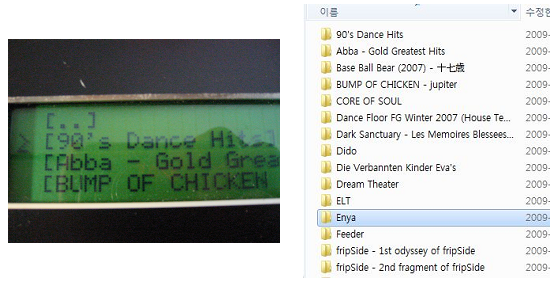
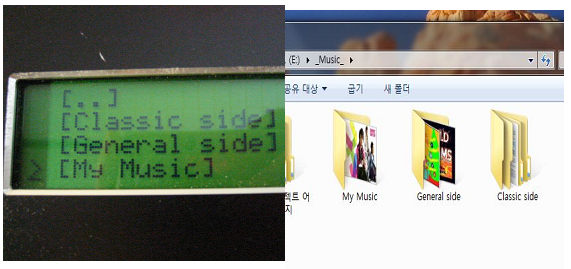
▶ 윈도우 공유 폴더를 CIFS (Common Internet File System;마이크로소프트에서 개발하고 사용중인 프로토콜) 형태로 마운트 한다. 리눅스 상에서 마운트 되었으므로 네트워크 디렉토리 역시 로컬 디렉토리와 같이 탐색과 실행이 가능하다.
[PNG image (310.12 KB)]
그림 1. 임베디드 장비 - 윈도우 공유폴더 접근
[PNG image (140.28 KB)]
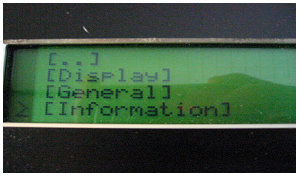
그림 2. 음악 파일 리스트를 응용하여 옵션 메뉴 리스트를 파일(디렉토리) 형태로 관리한다.
[PNG image (119.5 KB)]
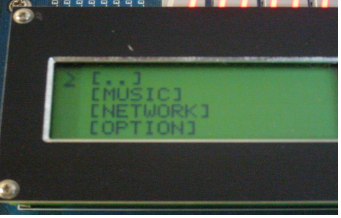
그림 3. 초기 화면.
음악 재생(MUSIC), 네트워크 연결(NETWORK), 옵션(OPTION) 중 원하는 메뉴를 키패드를 이용하여 선택한다.
[PNG image (140.67 KB)]
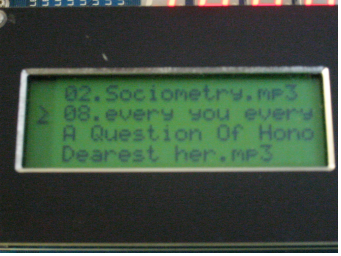
그림 4. 로컬 디렉토리
시스템 아키텍쳐는 크게 재생 모드와 탐색 모드로 나누어진다. 탐색 모드에서는 로컬 영역과 네트워크 영역의 음악 파일을 디렉토리 구조로 탐색할 수 있다.
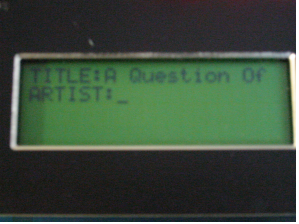
[PNG image (104.96 KB)]
그림 5. 음악 재생 모드
키패드 입력을 통해 볼륨 조절, 이전 곡, 다음 곡 선택이 가능하다.
Show Comments